


ReciScan - Cookbook Maker
4.15.00 Reviews
App Specs
- Version
- 1.0.82.0
- Updated On
- License
- Free
- Downloads
- 10,000+
- Developer
- Dustin Runnells
- Categories
- Food & Drink
- Platform
- Android
Screenshots

 Analysis by AppCompare
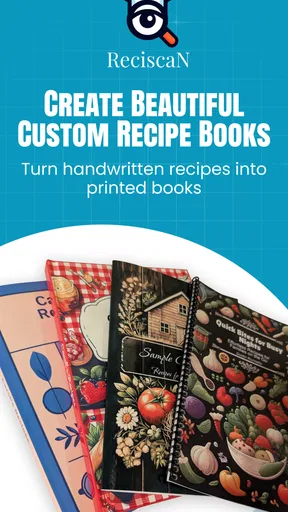
I approached ReciScan - Cookbook Maker as someone who wants to turn scattered recipes into something I can actually use in the kitchen. The idea is appealing: scan recipes, arrange them into a personal cookbook, and order a printed copy when the collection feels ready. That makes it more than a simple recipe reader. It is aimed at people who have accumulated handwritten cards, screenshots, clipped pages, or family recipes and want one organized result.
My overall impression is that ReciScan is most interesting when treated as a cookbook-building project rather than a daily meal-planning tool. The app is free to install, belongs to the Food & Drink category, and is developed by Dustin Runnells. It has an average rating of 4.1 from around two dozen ratings, with over 10,000 installs, so it has a modest but real user base. The age rating is Everyone, which fits the family-oriented nature of preserving and sharing recipes.
The important question is not simply whether it can scan a recipe. The useful question is whether the whole path from paper or screen to a readable personal cookbook feels manageable. In my experience, that is where the practical strengths and weaknesses of this kind of app become clear.
Getting past the points where cookbook projects usually stall
I’ve found that cookbook projects often lose momentum after the first successful scan, when checking, organizing, and refining each recipe starts to feel like a chore. In this section, I focus on small ways to keep that work manageable and catch problems early, so the finished collection feels intentional rather than merely assembled.
Scanning is only the beginning
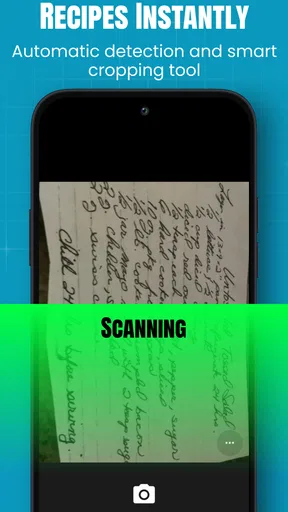
A recipe scan can look successful while still needing careful checking. A camera may capture the page clearly, but ingredients, fractions, abbreviations, and line breaks can remain easy to misread. I would not treat a scanned recipe as ready for printing without reviewing every quantity and instruction. This matters especially for details such as “1/2” versus “1 1/2,” oven temperatures, and short cooking times.
My practical advice is to scan in good light, keep the page flat, and review the result before moving on to the next recipe. If the source is a glossy magazine page, a dark card, or a page with handwriting crossing out ingredients, I would slow down rather than assume the first capture is accurate. The app can help move information into a cookbook workflow, but it cannot make an unclear original source clear.
There is also a useful mental shift here: scan in small batches. I would begin with five recipes from the same folder or family collection, check how consistently they appear, and only then commit to a larger project. This exposes problems early, before dozens of recipes need to be corrected.
Worth Reading Before You Choose

Flipboard Shows What News Apps Must Do Beyond the Feed

Switching to Android Auto Means Rethinking Your Driving Routine

Google Calendar Makes a Crowded Week Easier to Manage

Ludo King Makes the Most of the Minutes Between Plans

Baby Panda World Brings Quick Play to Modern Phones, but Its Game Library Feels Busy

ESPN’s Live Game View Makes Following Close Games Easier
Design decisions affect how useful the printed book will be
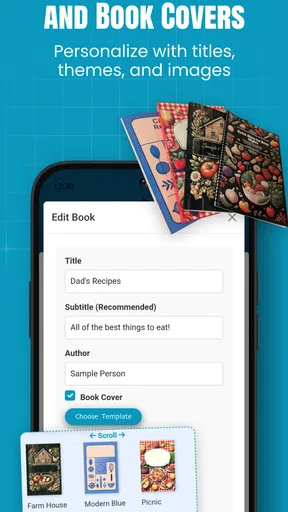
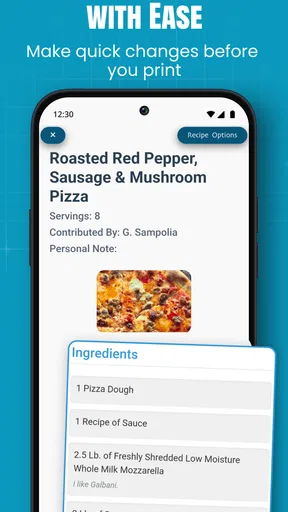
The design stage deserves more attention than it might receive at first. A cookbook is not just an archive; it is something I expect to open with flour on my hands and read quickly. A page that looks attractive on a phone may not be comfortable beside a mixing bowl. I would prioritize readable recipe text, clear separation between ingredients and directions, and enough breathing room around longer instructions.
For family recipes, I would also keep the original wording where it carries personality, but add clarifying notes when a step assumes knowledge that a newer cook may not have. For example, a relative’s instruction to “bake until done” may be meaningful to the person who wrote it but less helpful to everyone else. ReciScan is better used as a place to preserve and organize that material than as a substitute for editorial judgment.
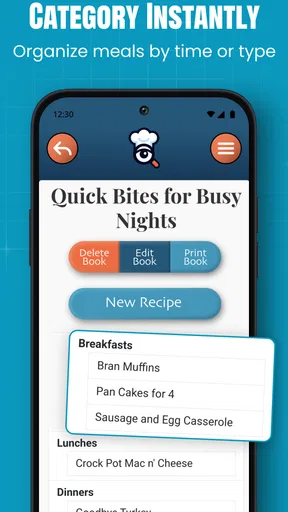
A non-obvious benefit of this workflow is that it encourages me to decide what belongs together. Instead of creating one enormous mixed collection, I might separate everyday dinners, holiday baking, and inherited family recipes. That makes the finished book easier to navigate and also helps reveal which recipes still need testing before I order anything printed.
What to check before blaming the app
When something feels wrong during setup, I first check the source material and the phone itself. A blurry image, cropped page edge, glare, or an angled camera position can create an output problem that looks like an app problem. I also make sure the operating system meets the app’s requirement; ReciScan supports Android 7.0 and later, so an older device may be the first thing to rule out.
I would keep the app updated as well. The current version is 1.0.82.0, and using the current release is a sensible first step if a screen behaves unexpectedly. I would then close and reopen the app, repeat the smallest possible action, and avoid changing several things at once. That makes it easier to tell whether the issue came from the scan, the selected recipe, or the workflow itself.
Because the app connects scanning, design, and printed-book ordering, a user may assume that every stage is equally automatic. I would not. Each stage should be checked separately: first the captured recipe, then its presentation, then the final order review. This simple separation prevents one imperfect scan from contaminating the entire project.
Recovering when a recipe does not look right
If a recipe comes through incorrectly, my first recovery step would be to return to the original page rather than repeatedly editing a flawed result. A fresh scan with the page centered and evenly lit is often more efficient than trying to repair every line. For a handwritten card, I would compare the digital version directly with the card while making corrections, especially for quantities and ingredient names.
I would also avoid scanning a stack of pages as one hurried session if each page has a different layout. A cookbook page, a narrow newspaper clipping, and a handwritten index card may need different positioning and review. Treating them as separate source types makes the process less frustrating.
Another useful recovery habit is to keep a small handwritten or digital checklist of recipes that still need verification. That prevents a common mistake: assuming that a recipe is finished simply because it has been imported. The checklist can include missing titles, uncertain quantities, incomplete directions, or photographs that need to be captured again.
If the design looks crowded, I would not immediately rebuild the whole cookbook. I would test one representative recipe first: a short recipe, a long recipe, and one with unusual formatting. Those examples show whether the problem is isolated or part of a broader layout choice. This is especially important before ordering a printed book, because print is the point where a small readability issue becomes permanent.
Ordering is a commitment, not just another save button
The printed-book option is the feature that gives ReciScan a distinctive purpose, but it also raises the standard for proofreading. Before ordering, I would read the collection as if I had never seen the recipes before. I would look for duplicate entries, missing pages, inconsistent titles, and instructions that were obvious only because I remembered the original source.
The app itself is free, while in-app purchases are listed at $4.99 per item. That means I would separate the decision to explore the app from the decision to pay for an item. I could use the free starting point to understand the scanning and design workflow, then decide whether the finished collection is valuable enough to justify the purchase. I would not begin with a large family archive until I was comfortable with the process.
For a gift, I would be even more cautious. A printed cookbook made from family recipes has emotional value, but a missing ingredient or unreadable instruction can matter more in that context. I would ask another family member to review important recipes before placing the order. A second pair of eyes is particularly useful for handwriting and recipes that use local names for ingredients.
When the app is not the cause of the trouble
Some frustrations come from the nature of old recipes rather than from ReciScan. Handwritten cards may use shorthand, ingredients may be listed in a different order from the instructions, and older recipes may assume equipment or techniques that are no longer common. Scanning preserves those quirks; it does not automatically resolve them.
The same is true for source quality. A recipe photographed from a screen can contain reflections or compression artifacts, while a folded card may have shadows along the crease. If the source is difficult for a person to read, it is reasonable to expect extra review after scanning. I see this as a reason to plan a verification pass, not as evidence that the app has failed.
Device conditions can matter too. A nearly full phone, an unstable connection during an online step, or a camera lens covered by fingerprints can create confusing results. My troubleshooting order would be simple: clean the lens, improve the light, check available storage, confirm the device meets the operating-system requirement, update the app, and retry with one uncomplicated recipe.
If the same issue continues with a clear, centered source while other recipes work normally, I would document exactly what happened before seeking help. The useful details are the recipe type, the step where the workflow stopped, and whether restarting changed anything. That is much more helpful than saying only that “the scan failed.”
How it compares with keeping recipes the usual way
A notes app is faster for typing a recipe from scratch, and a cloud document is usually better for collaborative editing. A dedicated recipe website may be more convenient when the goal is discovering new meals. A physical binder is simple, familiar, and easy to rearrange. ReciScan makes the most sense when the main task is converting existing recipes into a designed cookbook that can eventually become a printed object.
That focus is both its advantage and its limitation. If I only need three recipes for this week, opening a general notes app may be less work. If I want a searchable, constantly changing meal database, another tool may suit me better. ReciScan becomes more compelling when I have a meaningful collection of paper or personal recipes and care about preserving them in a unified format.
I also would not expect it to replace a full recipe-management system for advanced planning. Someone who needs detailed shopping lists, nutritional analysis, pantry tracking, or extensive meal scheduling should look elsewhere. The appeal here is the path from scattered source material to a personal cookbook, not an all-purpose kitchen command center.
Who will get the most from it
I think ReciScan is a strong match for someone sorting through a parent’s recipe box, preparing a family cookbook, or turning years of clipped recipes into one coherent collection. It could also work well for a home baker who wants a printed record of tested recipes rather than another folder of loose pages.
It is less suitable for someone who dislikes proofreading or expects scans to be perfect without review. It is also not the first app I would choose for someone whose main interest is browsing recipes, planning weekly meals, or calculating nutrition. The app asks for a project mindset: gather, scan, inspect, arrange, and only then order.
A realistic everyday example would be a Sunday afternoon spent organizing a small box of family cards. I would scan a handful, compare each digital version with the original, group them by type, and mark uncertain instructions for later testing. After cooking one or two recipes, I could correct the wording while the details were still fresh. Only after that cycle would I consider creating the printed collection. That approach turns the app into part of a useful household routine instead of a one-time scanning experiment.
My practical verdict
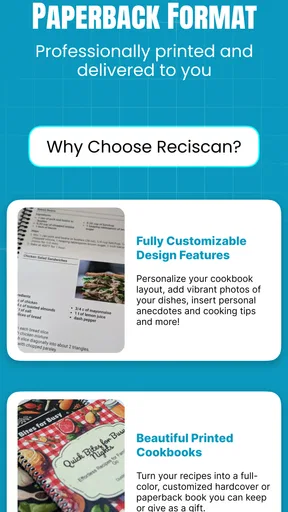
ReciScan - Cookbook Maker has a clear and appealing purpose: it helps bridge the gap between recipes people already own and a cookbook they can organize and order. I like that it treats personal recipes as material worth preserving, rather than pushing users toward a generic online catalog. The combination of scanning and design gives it a more personal role than a standard recipe app.
My reservation is that the workflow rewards patience. The app should not be treated as a magic button that turns every messy card into a publication-ready page. The best results depend on careful captures, deliberate organization, and a final proofread. Users who understand that will likely get much more from it than users expecting instant automation.
At no cost to install, it is reasonable to try with a small sample before deciding whether the printed-book path fits your needs. The listed purchase price of $4.99 per item makes it especially sensible to test the process first and commit only when the collection is genuinely ready. For me, the deciding factor would be the value of the recipes themselves: if preserving them matters, the extra checking feels worthwhile.
My recommendation is straightforward: try ReciScan with a few clear recipes, inspect every result, and judge it as a cookbook-making tool rather than as a general recipe app. If your goal is to rescue family recipes from paper and shape them into something lasting, it is worth exploring. If you only want fast meal ideas or automated weekly planning, a different kind of Food & Drink app will probably serve you better.
Pros
- Scans recipes quickly from photos
- screenshots
- and handwritten notes.
- Keeps ingredients and instructions organized in one searchable cookbook.
- Useful for preserving family recipes in a digital format.
- Makes recipes easier to access while shopping or cooking.
- Can reduce the need for printed recipe cards and loose notes.
Cons
- OCR may misread handwriting
- unusual ingredients
- or decorative fonts.
- Scanned recipes often need manual editing before they are ready to use.
- Image quality affects recognition accuracy and imported recipe formatting.
- Advanced organization or export tools may require a paid plan.
- Users should review saved recipes for missing quantities or instructions.
FAQs for ReciScan - Cookbook Maker
What is ReciScan - Cookbook Maker and how does it work?
ReciScan - Cookbook Maker is designed to help you turn recipes from photos, screenshots, or scanned pages into organized digital recipes. After importing an image, the app uses text recognition to identify ingredients, instructions, and other useful details. You can then review the extracted content, correct mistakes, and save the recipe in your personal cookbook for easier access later.
Can ReciScan accurately scan handwritten or printed recipes?
The app is generally most reliable with clear, well-lit photos of printed recipes and neatly written handwriting. Recognition quality can vary depending on the image resolution, font, page layout, shadows, and stains. Before saving a scanned recipe, it is recommended to check every ingredient, quantity, and cooking instruction carefully, since text recognition may occasionally misread symbols, abbreviations, or unusual handwriting.
Can I edit and organize recipes after scanning them?
Yes, one of the useful features of ReciScan - Cookbook Maker is the ability to refine recipes after importing them. You can typically correct scanning errors, adjust recipe names, and keep your collection more organized. This is especially helpful when building a personal cookbook from family recipes, magazine clippings, screenshots, or notes, although the exact organization and editing tools may depend on the current app version.
Does ReciScan - Cookbook Maker require an internet connection?
Some functions may work directly on your device, while others can depend on online processing, account services, or cloud synchronization. Because requirements can change between app updates and may differ between Android and iOS, check the app listing and its permissions before downloading. If you plan to scan recipes while traveling or in the kitchen without Wi-Fi, test the scanning feature offline first.
Is ReciScan - Cookbook Maker free to download and use?
ReciScan - Cookbook Maker may be available as a free download, but certain features can be restricted by in-app purchases, subscriptions, advertisements, or usage limits. Before creating a large cookbook, review the pricing information shown in the Google Play Store or Apple App Store. Also check whether exporting, unlimited scans, cloud backup, or advanced recipe tools require a paid plan.


